217 results found
-
Why can't I see Mortgage Manager in my Online Banking?
If you have an Old National Mortgage, and don't see Mortgage Manager in Online Banking, you may need to adjust your browser settings. You can find browser troubleshooting guides in our Mortgage Manager Resource Center.
If, after adjusting your settings, you are still unable to see Mortgage Manager, please contact Mortgage Servicing at 1-866-853-3277.
-
How do you write a check?
To write your check, fill out the fields carefully and sign at bottom right. We’ve included a properly filled out check below, as an example.
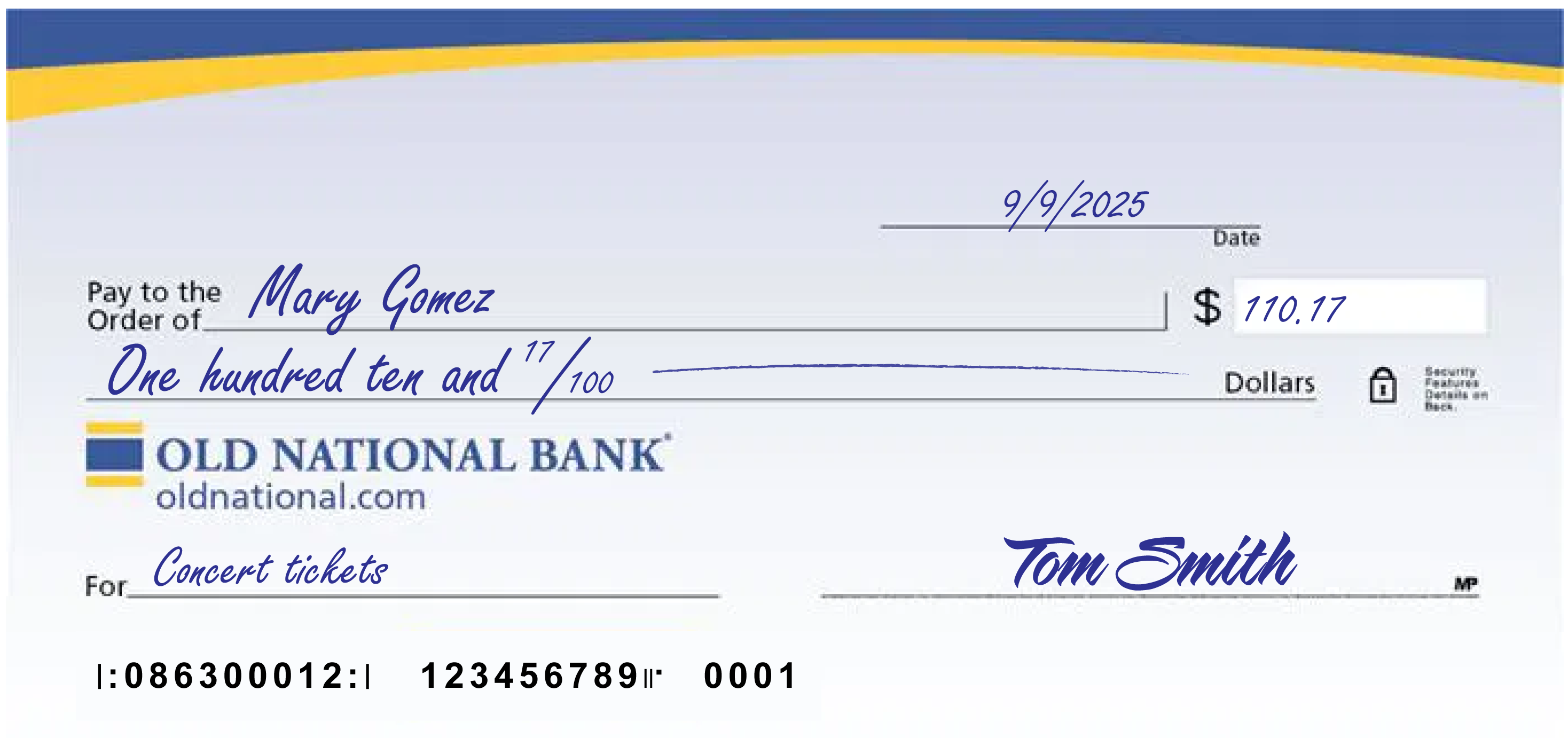
A few notes:
- The date at the upper right can be any standard format that includes the day, month and year.
- Write the full name of the person, business entity, or organization who is receiving the check in the “Pay to the Order of” field.
- The box at the right is for a numerical representation of the amount you’d like to pay the recipient.
- The line with “dollars” at the end is where you write out the amount you’d like to pay the recipient in words; write the cents as a fraction XX/100; if there’s extra space, draw a line until “dollars” so that no one can adjust the amount you wrote.
- The lower left field is for personal notes; this is optional. Some people like to write what the check is for, so they can remember when reviewing their records; If you’re paying a specific bill, you may be asked to write your invoice number or other identifying information you have on record with the company you’re paying.
- Sign the check at lower right with the signature that you use for all important documents.
- If you make a mistake on your check, you can cross it out and put your initials next to it and then write what you meant to write.
-
Why am I receiving calls regarding my loan account being past due when I have a grace period?
The grace period on your loan doesn't provide additional time beyond the due date to make a payment. The grace period only provides additional time before a late charge is assessed. If we don't receive your payment by the due date, it is considered late, and you may receive correspondence by phone or mail regarding the status of your payment.
-
How do I sign up for Online Bill Pay within Digital Banking?
Bill Pay is a free service that enables you to pay your credit card bill, cell phone bill, mortgage payment, utilities, individuals or really any bill you want to pay. Payment is taken directly from your Old National account. It's easy to begin using Online Bill Pay:
From a web browser
- Log in to Digital Banking
- Choose Pay or Transfer, then choose Bill Pay in the top menu
- You may need to enter a few pieces of identification, otherwise, review and check the box agreeing to the Terms & Conditions
- Click Complete Sign Up
- Begin adding information for the business or person you want to pay
Within Digital Banking, you can make one-time payments and set up automated, repeat payments. You can also enroll to receive eBills (electronic bills) from payees with Bill Pay and view your eBills history.
Please note: Depending on the party you are paying, payments may be sent electronically or a physical check will be produced and mailed.Our Bill Pay has its own FAQ as well. You can find it on the Bill Pay screen in the lower right corner under I want to. . .
In the Mobile App
- Open the Mobile App
- Choose Pay & Transfer, then choose Bill Pay
- Select Payees at the top right of the screen
- In the Add a person or business field begin adding information for those you want to pay
If you need assistance with enrolling in Bill Pay, please contact Client Care at 1-800-731-2265.
-
Can I open a checking account online?
We do provide a way to open most checking accounts online. Go to our Compare Checking Accounts page, find the account that best suits your needs and select the Open Account button.
We offer a variety of checking accounts to meet different needs. If you would like to talk to someone about the type of checking that would be best for you, please visit a banking center or call us at 1-800-731-2265.
-
Can I use Digital Banking to make an Old National loan payment from a non-Old National checking account?
Yes, we provide options to pay on your Old National loan from a checking account outside of Old National.
For auto loan and other consumer loan payments:
- Sign in to Digital Banking, go to Pay or Transfer in top navigation and select Loan Payment at the bottom of the drop down.
You will be taken to a screen where you can input information for the external account you want to take your payment from. Please note that the account at another financial institution will need to be verified, so you may not be able to make your payment immediately.
For mortgage loan payments:
- Access Mortgage Manager within Digital Banking - Mortgage Manager: How to Access Online and Mobile guide.
- Within Mortgage Manager, there are several options for making payments. All will enable you to input information for an external account you want to make a payment from. Following are guides to walk you through the process :
- Make a One-Time Payment - How to Make a Mortgage Payment guide
- Enroll in Autopay - How to Enroll in Autopay guide
Currently, only mortgage loans can be paid from within the Mobile app. Payments for other types of loans can only be made within a web browser.
-
When will my deposit be available?
Funds deposited to your account will be available to you, based on several factors we have listed below.
A check written from an account at a bank other than Old National:
Will not be available until the next business day (if it was deposited by the close of business and there are no holds placed on the checks). This means these funds will not be available to cover checks or other debits processed that night. An extended hold also may be needed. You will be notified if an extended hold is placed on the deposit.A check written from an account at Old National:
Will be added to your account and will have same-day availability (if it was deposited by the close of business). This means these funds will be available to cover checks or other debits processed that night.1Cash or Direct Deposit (e.g. payroll, Social Security):
Will be available the same day as deposit.1
1 Deposits of this type made at an ATM or by mobile deposit prior to daily cutoff times are credited to your account and available to cover checks or other debits being processed that night. -
What is the "Pending" transaction in my Digital Banking transaction history?
When you see “Pending" transactions in your Digital Banking history, it can represent two different types of activities on your account:
ATM or Debit Card Transactions
This "Pending" transaction could be a recent ATM or Debit Card transaction that has not yet posted to your account. For example, it could be an ATM withdrawal or a Debit Card purchase you made from a merchant. You will be able to see specific details, such as the name of the store where you made a purchase, after the transaction has posted to your account.Certain Deposits
A "Pending" transaction can also be a recent deposit which has checks or other items from a bank other than Old National and are, therefore, not available for you to immediately withdraw. This type of transaction will show under "Pending," as both a deposit and as a withdrawal, until Old National collects the funds from the other bank. Once these funds are collected, they will become part of your available balance and will no longer show as a withdrawal on your account. This could be as soon as the next business day after your deposit is made, but in some instances it may be longer.To obtain additional details about "Pending" transactions, you can contact Client Care at 1-800-731-2265.
-
How do I set up automatic payments for my Old National loan?
For mortgage loans:
- You can set up automatic payments using Mortgage Manager within Online Banking. Visit our Mortgage Manager resource page for information on using Mortgage Manager. The following guides will walk you through setting up automatic payments:
- Enroll in Autopay - How to Enroll in Autopay guide
- As another option, you can download and return the Mortgage Loan Auto Pay form to set up automatic payments. This form can be returned to a banking center, mailed to PO Box 3789, Evansville, IN 47736 or emailed to mortops@oldnational.com.
For all other personal loans, such as auto loans:
- Download and return the Consumer Loan Auto Pay form to set up automatic payments. This form can be returned to a banking center or mailed to PO Box 3728, Evansville, IN 47736.
- You can also set up a repeat transfer of funds within Online Banking to make a regular payment on your Old National loan. Within Online Banking, go to Move Money and in the drop down select Make a Transfer to set up a repeat transfer from an Old National account. Select Loan Payment (under Move Money) to set up a repeat transfer from an account outside of Old National.
If you need assistance setting up an automatic loan payment or want us to mail an auto pay form to you, please contact Client Care at 1-800-731-2265 or visit any Old National banking center.
- You can set up automatic payments using Mortgage Manager within Online Banking. Visit our Mortgage Manager resource page for information on using Mortgage Manager. The following guides will walk you through setting up automatic payments:
-
What is a line of credit loan?
A line of credit loan is a flexible loan that allows you to borrow what you need, as you need it, up to a set credit limit. As long as you follow your repayment terms, the loan remains open and you can borrow again. The most common example is a credit card, where you can continue to use it month after month, provided your account is in good standing. Other examples include Home Equity Lines of Credit (HELOCs) and revolving lines of credit for businesses.
The contrasting loan type is a fixed loan, where you’re given a set amount of funds upfront, with the expectation that you repay the loan amount with interest over a set period of time. Once you’ve paid off the loan, there’s no opportunity to borrow again; you’d need to reapply for another loan. Common examples include mortgages, car loans and personal loans.