Best Matches
Find an Old National Location
Looking for a convenient banking center near you? Our branch locator can help. You can also look up hours and search for surcharge-free ATMs.
2,499 results found
-
Basics of Banking
How do you start your journey to financial success? Learn the basics! Old National has put together a Financial Basics Q&A for those new to banking.
-
Wealth Management Services
Old National Wealth Management specializes in managing money for people with more important things to manage. Talk to us for unparalleled wealth management services.
-
Financial Calculators
Old National has a variety of calculators, to help with everything from what a mortgage payment might be . . . to whether it makes sense to refinance your auto.
-
If I have a notice of error or request for information about my loan, can I submit it on my payment coupon or other payment form?
No, a notice on a payment coupon or any other payment form is not considered a notice of error or request for information.
If you have a question or concern about a loan payment, please contact our Client Care Center at 1-800-731-2265. (Monday – Friday, 7am-6pm CT/8am-7pm ET and on Saturday, 7am-noon CT/8am-1pm ET).
-
What transactions can I complete at a drive-thru window?
Most of your banking transactions can be completed through our drive-thru windows, including:
- Check deposits
- Standard withdrawals
- Bill payments
- Transfers
- Loan payments
Our Convenient Ways to Bank guide provides a list of the transactions you can complete in the drive-thru, as well as through other Old National channels.
Use our locator to find your banking center and their direct phone number.
-
How can I cancel a pending mortgage payment?
The easiest way to cancel or edit a scheduled mortgage payment is within Mortgage Manager. Follow the How to Make a Mortgage Payment guide and select Scheduled payments. There you will be able to edit or delete a pending payment.
For assistance in changing or cancelling a pending online payment, please call 1-866-853-3277 at least one full business day prior to the scheduled draft payment.
-
Why can't I see Mortgage Manager in my Online Banking?
If you have an Old National Mortgage, and don't see Mortgage Manager in Online Banking, you may need to adjust your browser settings. You can find browser troubleshooting guides in our Mortgage Manager Resource Center.
If, after adjusting your settings, you are still unable to see Mortgage Manager, please contact Mortgage Servicing at 1-866-853-3277.
-
Why am I receiving calls regarding my loan account being past due when I have a grace period?
The grace period on your loan doesn't provide additional time beyond the due date to make a payment. The grace period only provides additional time before a late charge is assessed. If we don't receive your payment by the due date, it is considered late, and you may receive correspondence by phone or mail regarding the status of your payment.
-
How do I sign up for Online Bill Pay within Digital Banking?
Bill Pay is a free service that enables you to pay your credit card bill, cell phone bill, mortgage payment, utilities, individuals or really any bill you want to pay. Payment is taken directly from your Old National account. It's easy to begin using Online Bill Pay:
From a web browser
- Log in to Digital Banking
- Choose Pay or Transfer, then choose Bill Pay in the top menu
- You may need to enter a few pieces of identification, otherwise, review and check the box agreeing to the Terms & Conditions
- Click Complete Sign Up
- Begin adding information for the business or person you want to pay
Within Digital Banking, you can make one-time payments and set up automated, repeat payments. You can also enroll to receive eBills (electronic bills) from payees with Bill Pay and view your eBills history.
Please note: Depending on the party you are paying, payments may be sent electronically or a physical check will be produced and mailed.Our Bill Pay has its own FAQ as well. You can find it on the Bill Pay screen in the lower right corner under I want to. . .
In the Mobile App
- Open the Mobile App
- Choose Pay & Transfer, then choose Bill Pay
- Select Payees at the top right of the screen
- In the Add a person or business field begin adding information for those you want to pay
If you need assistance with enrolling in Bill Pay, please contact Client Care at 1-800-731-2265.
-
How do you write a check?
To write your check, fill out the fields carefully and sign at bottom right. We’ve included a properly filled out check below, as an example.
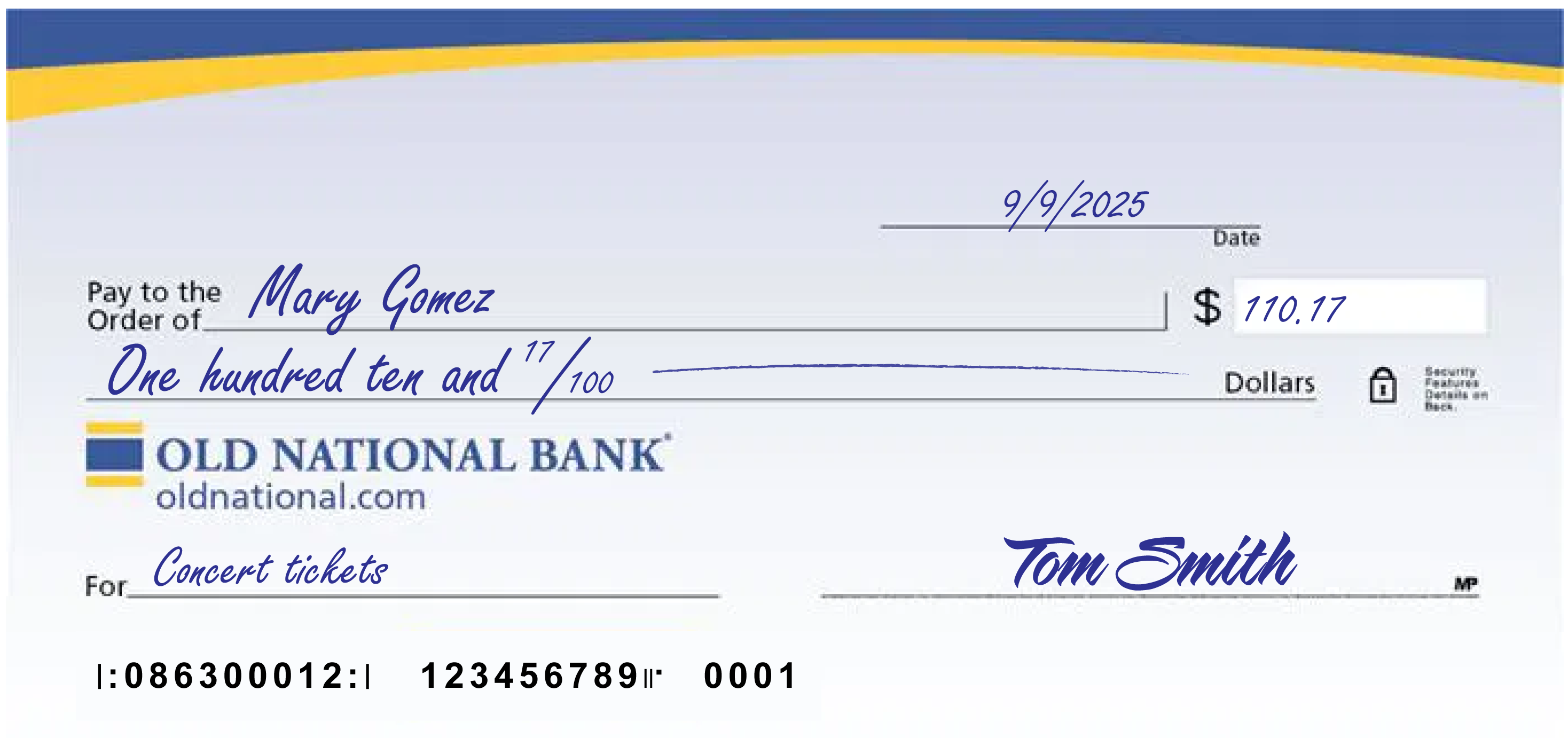
A few notes:
- The date at the upper right can be any standard format that includes the day, month and year.
- Write the full name of the person, business entity, or organization who is receiving the check in the “Pay to the Order of” field.
- The box at the right is for a numerical representation of the amount you’d like to pay the recipient.
- The line with “dollars” at the end is where you write out the amount you’d like to pay the recipient in words; write the cents as a fraction XX/100; if there’s extra space, draw a line until “dollars” so that no one can adjust the amount you wrote.
- The lower left field is for personal notes; this is optional. Some people like to write what the check is for, so they can remember when reviewing their records; If you’re paying a specific bill, you may be asked to write your invoice number or other identifying information you have on record with the company you’re paying.
- Sign the check at lower right with the signature that you use for all important documents.
- If you make a mistake on your check, you can cross it out and put your initials next to it and then write what you meant to write.