Best Matches
How to Order (or Reorder) Checks
Order checks in several convenient ways: by phone, on the web, at a Banking Center, via Client Care, or through Online Banking (reorders only). Click to get started.
2,227 results found
-
Can I use ATMs that are not Old National or Allpoint ATMs?
Yes. Your Old National ATM/debit card will work at all ATMs. However, doing so may result in several fees.
Surcharge fees
Out of network ATMs (ones that are neither Old National nor Allpoint) may assess you a surcharge fee. An ATM surcharge fee is the fee an owner of an ATM charges cardholders from other financial institutions who use their machine. In other words, if you have an Old National debit card and use it at another bank's ATM, that bank may assess a surcharge.Foreign fees
For most types of checking accounts, Old National will charge a $3.00 "foreign" ATM fee (on top of any ATM owner surcharge) if you use a non-Old National Bank or non-Allpoint ATM.To ensure fee-free ATM usage, we recommend always using an Old National or Allpoint ATM when possible. To find an Old National or Allpoint ATM, go to our website locator at oldnational.com/locations. Select the "ATM" and "Allpoint Surcharge-Free ATM" filters. You can also use the locator within our Mobile App to find both Old National and Allpoint ATMs.
-
Where should I send a notice of error or request for information about my loan?
Please mail all notices of error or requests for information about your Old National loan to:
Old National Bank
Attn: Client Success
P.O. Box 143
Evansville, IN 47701 -
Where can I find my Old National checking or savings account number?
Within Online Banking, your full account number can be found through the following steps:
- After you log in to Online Banking, click on the account name for which you want an account number. Please remember that your account number will be different for each account.
- Clicking on the account name will take you to the Account History page. On this page, click on Account Details to reveal more information about your account. Your full account number is the ACH number.
- On the bottom right of the account details, you can print your account detail information or click the X to close the account details.
You can also find your full checking number in the following ways:
- On a mailed statement or eStatement within Online Banking. Your account number is on the upper right corner of the statement.
- At the bottom of a physical check or the bottom of a check image within Online Banking. You will see three sets of numbers at the bottom of the check. Your account number is the center set of 7-10 numbers. (Note that the set of numbers on the left, 086300012, is the Old National routing number.)
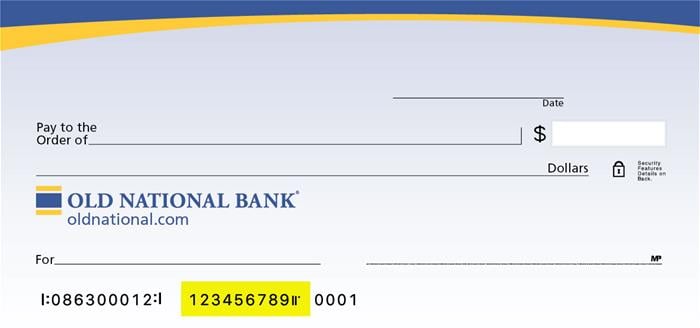
Visit any Old National banking center for assistance.
-
How do I change the address, phone number or email address on my account?
To change your mailing address, Old National offers several options:
- Please call 800-731-2265 Monday – Friday 7am to 6pm CST or on Saturday from 7am till noon CST.
- You may visit any Old National banking center and provide an updated photo ID or utility bill that contains the new address.
- Download a Personal Address Change Form or Business Address Change Form that you can mail to Old National.
To change your phone number or email address:
- Within Online Banking, go to My Settings and click Edit next to either your phone number or email address to update this information.
- You may also visit any Old National banking center or call Client Care at 1-800-731-2265.
Please note that changes can only be applied to the information for the person requesting the change. If there are additional people listed on the account, those individuals will need to request updates for their own information.
-
Why is my request for Digital Banking access showing as declined or pending?
When you complete the Digital Banking enrollment process, we must verify the information you provide in order to prevent any unauthorized access to your account. The security of client information is one of our highest priorities. If your request for Digital Banking has been declined, it most likely means we were not able to successfully verify the information you provided during the enrollment process. A pending status most likely means we are working to verify your information. We will email you to notify you when your Digital Banking enrollment request is approved or declined.
If you have questions or concerns about your Digital Banking enrollment, please call Client Care at 1-800-731-2265, and one of our associates would be happy to assist you.
-
1 in 3 employees believe their company’s cybersecurity is a moderate or major problem
With 1 in 3 employees believing the cybersecurity of their company is a moderate or major problem, decision-makers must do more to reassure them.
-
7 early money habits that make or break first-time founders
Early money habits are not just about survival. They quietly determine whether you build a durable company or a fragile one.
-
Do You Have More or Less Money in Savings Than Other People Your Age?
If you have less money saved on average than people in your age group, here are a few ways to grow your savings.
-
Healthcare: Are We Headed Into an M&A Boom or Bust?
The coronavirus pandemic has upended lives and industries, and the senior housing market remains in the crossfire. The pandemic started as a public health issue that has also become an economic issue, and the senior housing industry has felt the impact on both fronts. As senior housing providers continue to battle the
-
The Pros and Cons of Auto Refinancing or Is Auto Refinancing Right for You?
If one of your goals is to improve your financial wellness, you’re likely making wallet-savvy moves like cutting back on impulse purchases or building your emergency fund. That might make you wonder about other options to save money, such as the benefits of refinancing an auto loan. What is auto refinancing? Simply put